Mobile Rendering
Mobile GLSL Shader Showcase
A collection of Unity real-time material studies built around mobile-friendly shader techniques: stylized car paint, lava flow masks, animated cloud surfaces, and liquid reflection waves.
Overview
The goal of this shader collection is to create visually rich material motion without relying on expensive simulation. Most effects use authored masks, baked distance maps, packed texture channels, simple UV animation, and vertex-stage deformation to keep the runtime cost practical for mobile or game-engine use.
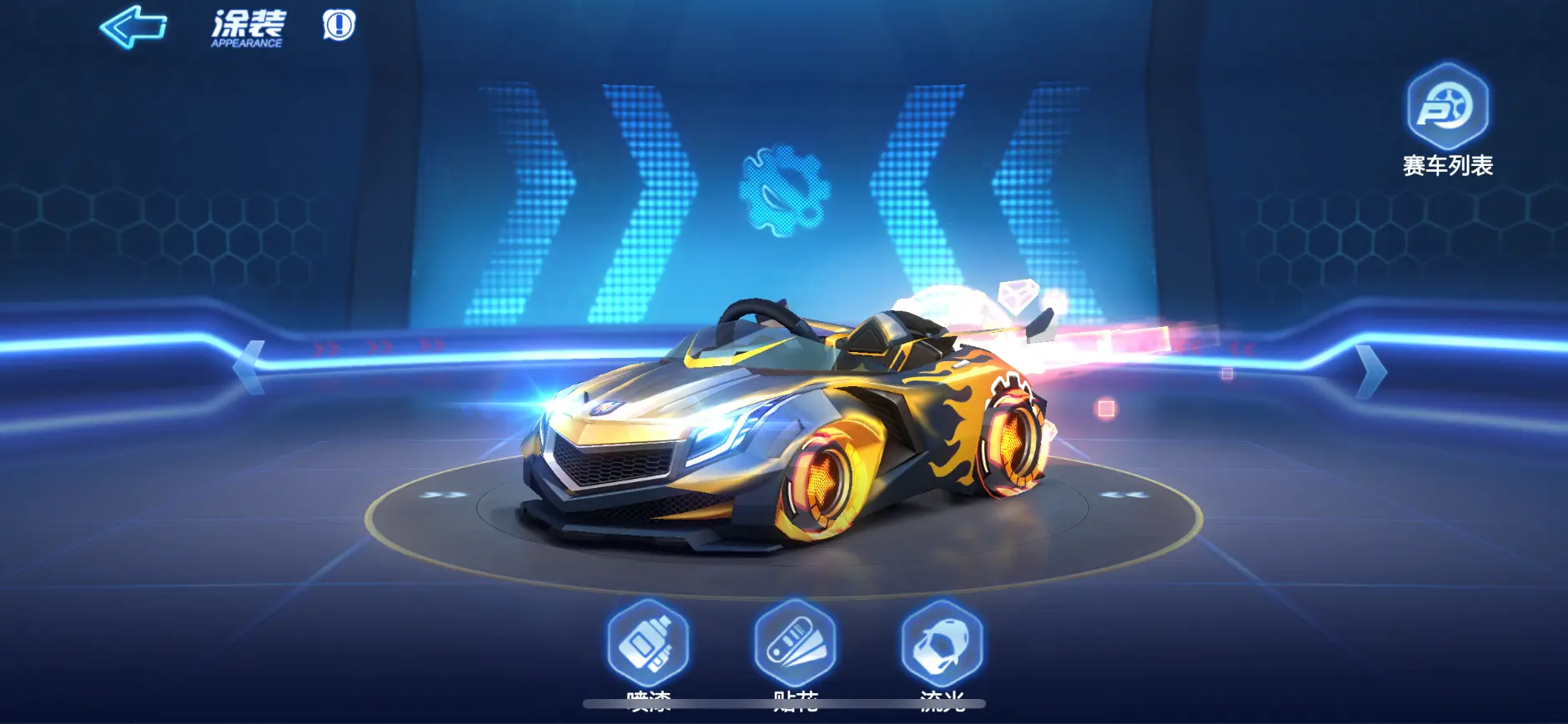
Material 1
Car Paint and Lava Flow
The car paint shader uses a baked distance map from Substance as a mask to control where flame-like lava motion appears. A wave texture offsets the lava UVs over time, while a secondary gas/noise sample adds variation inside the masked region.
// Fragment shader snippet: animated lava mask.
float speed = frac(_Time.x * _lavaSpeed);

float2 waveUV = (i.texcoord.zw + float2(0.0, speed)) * 2.0;
float wave = tex2D(_lavawaveTex, waveUV).r * 2.0 - 1.0;
wave *= _lavaWave;

float2 gasUV = float2(
    i.texcoord.z * _gasOffset.x,
    i.texcoord.w * _gasOffset.y + frac(_Time.y * _gasOffset.z)
);

float gas = tex2D(_lavawaveTex, gasUV).g;
float lava = tex2D(_lavaTex, i.texcoord.zw + wave.xx).r;
float mask = tex2D(_lavaTex, i.texcoord.zw).g;

float4 lavaColor = (lava + gas * _gasOffset.w) * _lavaCol * mask;
Material 2
Stylized Cloud Material
The stylized cloud shader generates soft surface motion by sampling noise in object/world-related directions and applying the result in the vertex stage. This keeps the fragment stage relatively simple while making the silhouette feel alive.
// Vertex shader snippet: triplanar-style noise displacement.
float speed = frac(_Time.y * _speed);
float3 blend = v.vertex.xyz * _scale;

float noiseXY = tex2Dlod(_Noise, float4(blend.xy + speed, 0.0, 0.0)).r;
float noiseYZ = tex2Dlod(_Noise, float4(blend.yz + speed, 0.0, 0.0)).r;
float noiseXZ = tex2Dlod(_Noise, float4(blend.xz + speed, 0.0, 0.0)).r;

float noise = noiseXY;
noise = lerp(noise, noiseXZ, saturate(o.normal.y));
noise = lerp(noise, noiseYZ, saturate(o.normal.x));
noise *= v.color.r;

v.vertex.xyz += v.normal * noise * _range;
o.pos = UnityObjectToClipPos(v.vertex);
Material 3
Liquid Wave Reflection
The liquid material uses a flow map to offset projected reflection sampling. Two time-shifted reflection samples are blended to avoid visible resets, while a mask texture controls transparency and reflection strength.
fixed4 frag(v2f i) : SV_Target
{
    float speed = frac(_Time.y * _speed);
    float2 flowUV = float2(i.texcoord.x * _offset.x + speed,
                           i.texcoord.y * _offset.y);

    float2 flowDir = tex2D(_fmap, flowUV).rg * 2.0 - 1.0;
    flowDir *= _strength;

    float offset0 = frac(_Time.w * 0.5 + 0.5);
    float offset1 = frac(_Time.w * 0.5 + 1.0);
    float blendValue = abs((0.5 - offset0) / 0.5);

    fixed mask = tex2D(_MaskTex, i.texcoord).r;
    fixed4 refl0 = tex2Dproj(_ReflectionTex,
        UNITY_PROJ_COORD(i.refl) + float4(flowDir * offset0, 0.0, 0.0));
    fixed4 refl1 = tex2Dproj(_ReflectionTex,
        UNITY_PROJ_COORD(i.refl) + float4(flowDir * offset1, 0.0, 0.0));

    fixed4 refl = lerp(refl0, refl1, blendValue);
    refl.a *= mask * _Alpha * i.color.a;
    return refl;
}
Takeaways
Mobile-Friendly Shader Strategy
Author data offline
Use Substance or DCC tools to bake masks and distance maps instead of deriving everything procedurally at runtime.
Animate with cheap texture motion
Flow maps, time offsets, and dual-sample blending can produce convincing motion with predictable shader cost.
Move work to the vertex stage when possible
For stylized deformation, vertex displacement can create strong visual motion while keeping fragment shading simpler.